
Bulk Purchases
Purchase multiple Logier licenses at once and manage your entire team from a single dashboard. Team licenses include volume discounts, individual license keys for each seat, and a simple redemption flow so teammates can activate Logier on their own accounts in seconds.
Bulk Purchases & Team Licenses#
Managing Logier across a team is now easier than ever with Bulk Purchases. Instead of purchasing individual licenses one by one, you can buy multiple seats in a single order, receive a discounted price, and distribute license keys whenever your teammates are ready to join.
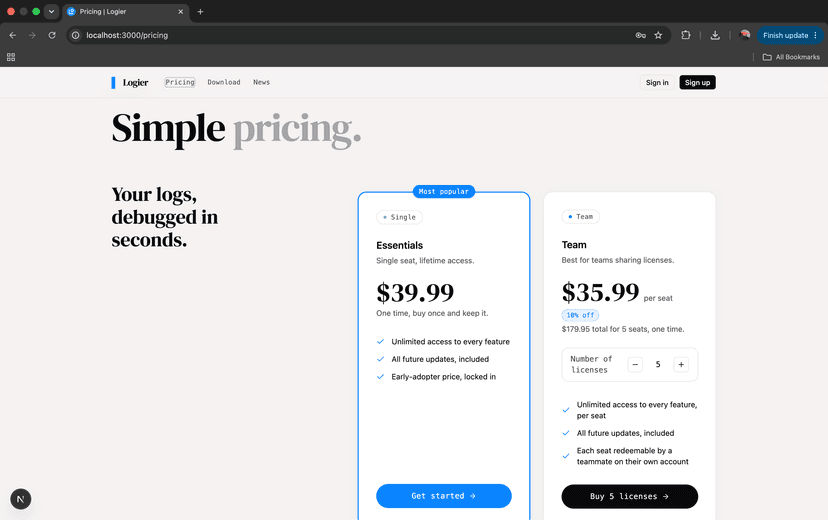
Team pricing#
The Pricing page now includes two license options:
- —Essentials – A single-user license for individual developers.
- —Team – Purchase between 2 and 100 seats with automatic volume discounts.
Both plans include:
- —Unlimited access to every Logier feature
- —All future updates
- —Lifetime access for purchased seats
The Team plan additionally includes:
- —Volume discount pricing
- —Individual redeemable license keys
- —Team license management
- —Easy seat distribution
Managing your team licenses#
After purchasing multiple seats, a new Team Licenses section appears on your Profile page.
Here you can:
- —View every purchased license key
- —See whether each seat is Available or Redeemed
- —Copy any license key with a single click
- —Track how many seats have already been activated
A progress summary at the top shows exactly how many licenses have been redeemed, making it easy to monitor your team's rollout.
Redeeming a team license#
Each purchased seat has its own unique license key.
To activate Logier, a teammate simply:
- Creates or signs into their Logier account.
- Opens the Redeem License page.
- Enters the license key they received.
- Instantly activates their own personal license.
Once redeemed, the seat is linked to that user's account and is marked as redeemed in the Team Licenses dashboard.
Existing customers#
If you already own an individual Essentials license, purchasing a Team license does not replace your existing license.
Instead, the additional seats are added to your account so they can be distributed to teammates independently.
License & Billing improvements#
The License & Billing section has also been expanded with additional information, including:
- —Your active license key
- —One-click copy for license keys
- —Purchase amount
- —Purchase date
- —Receipt download
- —Payment and customer information
- —Direct access to the Stripe Customer Portal for invoices and billing management
This provides a single location for managing both your personal license and any team licenses you've purchased.